Q. Does Easy Budget
work with Excel 2007 or Windows Vista? What about Open Office?
A. In addition to the standard
versions of EASY BUDGET, your program disc, (Features
or Commercials/video) contains a special version
which has been developed specifically for Excel 2007 and
Windows Vista. This version makes full use of the new ribbon
toolbar and other features only available with the latest
version of Excel and Vista.
However, this version will not work properly with
previous versions of Excel. Use the other version of the
program located on the program CD. The functionality in either
version is the same so there's no need to go out and buy a
new copy of Excel.
Sorry, but Easy Budget does not work with Open Office.
back to top
|
| |
| Q. I've seen other
programs for hundreds of dollars more. How can EASY BUDGET do
what the more expensive programs do?
A. EASY BUDGET not only does what the
expensive programs do, but it does even more, and most
importantly, it's easier to use. We
don't think anyone should pay that much money to make a budget!
The expensive, well-known programs you're referring to
are based on decade-old programming and a very user-unfriendly
interface. Many of our users
had already bought the $700.00 - $1,200 programs, then discovered
Easy Budget. Like thousands
of other production professionals, try EASY BUDGET and you'll
quickly agree too.
We4 encourage you to compare Easy Budget head-to-head with any budgeting program available at any price. Easy Budget is easier to use, a much lower cost and much more powerful than ANY of those other programs. Easy Budget wins everytime. back to top
|
| |
Q. Will I have
to learn new commands and key strokes to use EASY BUDGET?
A. No.
EASY BUDGET uses the same familiar interface you already have
with your existing spreadsheet software. Our simple
fill-in-the-blanks approach makes it even easier!
Although EASY BUDGET is an extremely powerful program, you don't
need to know anything special to use it.
If you still want one of the other programs,
you'll have to learn a bunch of special key stroke
combinations. You may also
need to buy training CD's andr pay to attend special classes
before you'll feel comfortable with the older, more expensive
program.
Up to you. back to top
|
| |
Q. Movie budgets are
complicated! How do I know where I should enter something
and where I shouldn't?
A. EASY BUDGET makes this...well...easy.
Every account in EASY BUDGET
is color coded. Wherever you see the color blue, you
can enter information. Anything
in black is a figure EASY BUDGET calculates for
you. After you've
set certain global values (i.e.;fringe benefit rates, length
of shoot, etc.), EASY BUDGET automatically applies the correct
values where they belong. You
can obtain the labor-related information
free-of-charge from our website. If you start on budget page one, you'll discover that many parts of the budget, even whole pages, will have been completed for you by the time you get there!
Back to top
|
| |
Q. Once I create my
budget, can I print out a presentation quality document?
A. Of course, printing quality ultimately
depends on your spreadsheet program and your printer's capabilities.
If your spreadsheet is correctly configured for your printer,
you'll be pleased with the excellent results. Although many other budgeting programs are difficult to print, or print dozens of nearly empty pages, you won't have this problem with Easy Budget. You
won't hesitate to show it to distributors, producers, investors
or a bonding company. Our users say that EASY BUDGET looks
the best of all.
Back to top
|
| |
Q. I've used other
budget programs that have "crashed" and I lost my work. Will
I have this problem with EASY BUDGET?
A. By using a spreadsheet program,
you can rely on the powerful and proven track record of these
successful programs and have little worry that your hard work
will be lost. All of those other programs were written from scratch and come with the crash-prone bugs built-in. Not so with Excel which has been the "Killer App" for 20 years and is powerful enough to send a space ship to Mars. In addition, Excel supports literally thousands of different printers
and has extensive on-line help. Many current versions of the
well-known $700.00 to $1,200 programs use an older 16 bit technology which
is not 100% compatible with today's operating systems. Be careful If
you have one of these programs, remember to save your work often!
back to top
|
| |
Q. Tell me about the
"Production Tips" included with EASY BUDGET?
A. The EASY BUDGET Instruction manual
(for either Feature Films or
Commercials), includes numerous time and money saving secrets.
If you're new to film budgeting,
these are important pieces of information which might take years
to learn. All this valuable
experience is yours to use...without learning the "hard way."
Even experienced pros will learn
a few new tricks by using these clever, time-tested suggestions.
Our extensive online help, (acessible directly from the program)
is a great resource as well.
Back to top
|
| |
|
Q. Does Easy Budget
handle entertainment labor unions?
A. EASY BUDGET deals with all entertainment-related
labor unions including: SAG, DGA, WGA, NABET, IAT&SE
and the Teamsters.
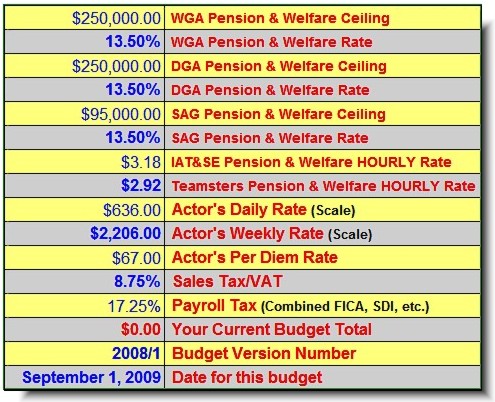
Simply type in the basic rates and percentages where indicated
and EASY BUDGET does the rest. EASY
BUDGET can include or exclude any group. Of
course , registered EASY BUDGET users have exclusive free
access to our extensive database of current guild and union
labor rates. Unlike the other programs, with EASY BUDGET you
only have to set these once and they are automatically applied
throughout the entire budget. What takes a few seconds to
accomplish in EASY BUDGET might take hours with other
programs.
Back to top
|
| |
Q. What does it mean
when you say that EASY BUDGET makes labor calculations "intelligently"?
A. Thanks to your spreadsheet, EASY BUDGET can invoke complex programming which analyzes the information you provide
and determines if a change is needed. For
example, EASY BUDGET "knows" that it's cheaper to hire a SAG
actor on a weekly contract rather than a daily contract if you
use the same actor for more than a certain number of days. This
often results in a major cost savings and helps you plan your
production better. After an
actor has signed a daily contract, you can't go back and require
them to sign a weekly one. NO OTHER program can do this.
Back to top
|
| |
Q. Is it difficult
to figure sales tax on items that will need to be purchased?
A. No, EASY BUDGET knows when and where
sales tax needs to be paid and includes it for you. This
takes a lot more time with other programs which require
you to manually add sales tax or VAT to every single item in
the budget.
Back to top
|
| |
|
Q. There's a lot of
pages in a production budget! Is there an easy way to know
the Total from anywhere in the program?
A. Yes, the running total is always
displayed at the top corner of your screen in the Feature
Films version, and along the bottom of the screen in the Commercials
version (including individual page totals).
Add two days to your shooting
schedule and the change is instantly displayed. Increase on-set
catering by 25 cents per meal and instantly
see the change to your bottom line. EASY
BUDGET makes these complex calculations on a global basis...no
need to adjust every single account and navigate through three
levels of detail like the other programs.

The other programs require that you make an entirely separate
budget to be able to make cost comparisons!
back to top
|
| |
|
Q. What if I'm not
working with unions or guilds?
A. EASY BUDGET easily accepts any
union or non-union configuration...or combinations
of both. Remember, EASY BUDGET
was designed by real independent-minded
filmmakers, not accountants, studio
bean-counters or computer nerds.
Back to top
|
| |
Q. Can I share my
budget or different version of my budgets with others?
A. Yes. In
fact, EASY BUDGET files are so small they can be attached to
emails as an added convenience. Even
if the other party doesn't have a spreadsheet, they can download
a spreadsheet "viewer" free-of-charge from Microsoft.
After 30 days, the emailed budget is
still viewable, but will become read only. So, you can decide if you want the other party to be able to make changes to your budget or not. With
the older, more expensive programs, whomever you share your budget
with MUST have the same, or a newer version of your $1200.00
program in order to view your budget. Now
that puts a hole in any budget!
back to top
|
| |
|
Q. I have a Macintosh
computer.
A. GREAT!
Both the Feature Film and Commercial versions of EASY
BUDGET are available for Macintosh. It's
important to note that our Macintosh versions were created
as Macintosh versions and not simply "ported" from
one operating system to another. (Note:
Make sure you have updated to at least OSX version 10.2 for
best results.)
Please note that Easy Budget will not work with MS Excel
2008, or newer. Easy Budget requires that Excel for
the Mac contain certain components to run correctly. Microsoft had
releases, but they chose not to. Easy Budget will work with
any other previous version of Excel for the Mac, (i.e., OfficeX,
Excel 2004). Please be careful and check which version of Excel
you have before ordering Easy Budget.
Back to top
|
| |
Q. What about technical
support?
A. Registered users are entitled to
technical support by phone at (818)671-3729 or (818)458-0827.
We also can help you via email:
support1 at easy-budget.com
and through our website if you live outside the U.S. Registering
your copy of EASY BUDGET is important not only for technical
support, but registered users are the first to know about upgrades
and new versions. Most upgrades
within the same version are available FREE to registered users. Only
registered users have access to our guild and union labor rates
database.
Back to top
|
| |
|
Q. Complicated shooting
schedules and locations.
A. Film shoots can sometimes be very
complicated to budget, especially when you have a mix of different
locations or a combination of studio and location production.
EASY BUDGET can handle this effortlessly.
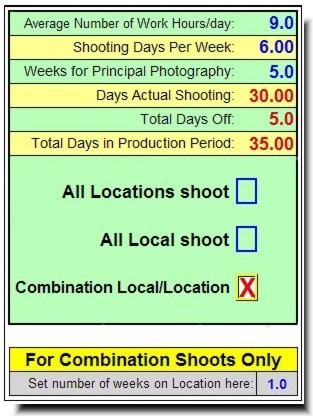
EASY BUDGET allows you to specify the number of days or weeks,
or partial days and weeks you're at a studio, (or your local
area) or out-of-town at a distant location. EASY BUDGET even
figures out how many non-production days-off you'll have as
compared to actual shooting days.
Back to top
|
| |
|
Q.
What's the Union and Guild labor database?
A. Making a movie with union or guild
technicians often means dealing with DOZENS of different labor
organizations. Obtaining the
correct information can be an overwhelming, time consuming
task. (Even more difficult
if you don't happen to live in downtown Hollywood or New York!)
To make this crucial part
of the budgeting process much easier, EASY BUDGET has created
an extensive web-based database which contains all the labor
information you'll need to prepare your initial budget. THIS
INFORMATION IS ONLY AVAILABLE TO REGISTERED EASY BUDGET OWNERS.
Simply type in your EASY BUDGET product serial number and
you'll have instant access to the database. Remember
to use this information for preliminary budgeting purposes
only. Prior to your production
start you'll have to contact the unions directly for the latest
information. The rate you
negotiate may be better than the published rates shown in
our database. Back to top
|